

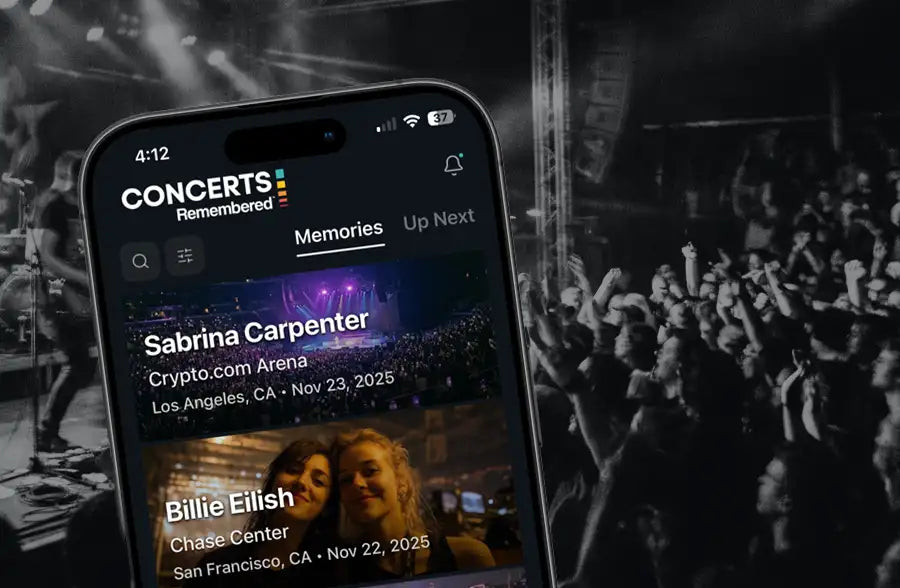
You've been to more concerts than you can count. You know you saw that band at least twice, maybe three times. You think the first time was better, but you're not sure. You have photos somewhere, probably scattered across three phones and two cloud accounts.
The Concerts Remembered app fixes this. It's a concert tracking app that stores your complete live music history in one place. Log shows past and future, add photos and ratings, capture the memories that matter, then watch patterns emerge over time.
This guide covers everything the app does and how to get the most out of it. You can log a concert in 30 seconds with just the basics, or go deep with photos, ratings, and memories when you have time. The app handles both. Quick-log the Tuesday night club show. Deep-dive the arena show that wrecked you.
What the App Does (The Short Version)
At its core, the app answers three questions:
- What concerts have I been to? (Searchable list with dates, venues, ratings)
- What do I remember about each one? (Photos, memories, setlists, experiences)
- What patterns do I see? (Stats, insights, badges)
You can log a concert in 30 seconds with just artist, venue, and date. Or you can go deep with photos, ratings across six categories, favorite memories, and full setlists. The app doesn't force a level of detail. It adapts to how much time you have.
Core Features
Past Shows and Upcoming Concerts
The app tracks both concerts you've already attended and shows you have tickets for.
Your concert history is searchable by artist, venue, or location. You can filter by date range, by rating, or by incomplete entries if you want to find shows that still need photos or setlists.
For upcoming concerts, the app shows countdowns so you know exactly how many days until each show. When the date passes, it moves automatically to your history and prompts you to add your memories while they're fresh. For more on how the concert countdown feature works, see The Concert Countdown App for People Who Actually Go to Concerts.
Logging a Concert
To log a concert, you just need the artist, venue, location, and date. That's it. Pick a show you remember well, maybe your most recent, maybe the one where you cried during the encore. Four fields and you're done.
After you save, the app asks follow-up questions to capture more detail: rating, favorite memory, who you went with, photos. The questions change depending on whether it's a recent show, an older one, or a future concert you have tickets for. You can skip any of them or all of them. Your concert is already saved. The follow-up is just for people who want to capture more while it's fresh.
From there, you can add as much or as little as you want.
Photos stay organized by show instead of lost in your camera roll. Add a few, pick your best one as the featured image, and that's what shows up on your concert card.
Ratings go beyond a single star count. You can rate the overall show, or break it down by sound quality, stage presence, audience energy, visuals. A small club show might just get an overall rating. A full arena production with pyro and costume changes might warrant the whole breakdown.
Memories capture the stuff that's easy to forget: your favorite moment, something the artist said between songs, how you felt walking out. The memory capture feature prompts you with age-aware questions that adapt based on how recently the show happened, but you write in your own words.
Experiences track things that happened: front row, lost your voice, cried during a song, made it backstage, road trip to get there. Check what applies. These feed into your stats and badges over time.
Setlists can be added manually or pulled from setlist.fm if someone already logged the show. The Setlist.fm integration in the app lets you import, mark your favorites, and note the surprises. Partial setlists are fine if you don't remember everything. Over time, your saved setlists reveal patterns about your concert identity you won't notice until they're all in one place.
Details cover the rest: tour name, ticket cost, seat location, who you went with, opening acts.
Quick-Log vs. Deep-Dive
Not every concert needs the full treatment. The app tracks completion for each entry so you can see which shows are basic and which are rich.
Quick-log (30 seconds): Artist, venue, city, date. Maybe a rating. Done.
Deep-dive (10 to 15 minutes): Full details, multiple photos, all ratings, memories, setlist. For shows that matter most.
Quick-log the routine ones. Deep-dive the ones that wrecked you. You can always come back. The mistake most people make is waiting until they have time for a full entry. A date and artist today beats a perfect entry you never write.
Insights and Stats
The more concerts you log, the more patterns emerge. The Insights dashboard tracks things you'd never bother calculating yourself: your most-seen artist, your busiest concert month, how many unique venues you've been to, your average days between shows.
After a few concerts, it figures out whether you're a Loyalist (you keep going back to the same artists) or an Explorer (always seeing someone new). It knows your home venue if you've been to the same place three or more times. It tracks your rating tendencies and tells you if you're a generous rater or a tough critic.
There's also a Gaps tab that shows which entries are missing photos, ratings, or setlists. When you have 10 minutes to kill, it's a built-in to-do list for filling in your concert history.
If you track ticket costs, the app totals your spending over time. It works across currencies if you've seen shows in different countries. You can see your average ticket price, your most expensive show, your cheapest.
Badges and Milestones
The app tracks milestones and unlocks badges as you log more concerts. Some reward quantity: your 10th show, your 50th, your 100th. Some reward loyalty: see the same artist three times and you're a True Fan, ten times and you're a Superfan. Others unlock when specific things happen: making it to the front row, losing your voice singing along, crying during a song you didn't expect to hit that hard.
There are also badges for filling out rich entries. Log 10 setlists and you're a Setlist Collector. Fill out 10 entries at 80% completion and you become an Archivist. The app shows which badges you've earned and which you're closest to unlocking, so you can see what's coming next.
Share Cards
Turn any concert into a shareable image. Open a concert, tap share, and the app generates a concert share card you can post to Instagram, add to your story, or send to the friend who was there with you.
You can use your own concert photo as the background or pick from gradients and mood options if you don't have a good shot. Choose a style that fits the vibe of the show. The card includes the artist, venue, and date. Add your rating and favorite memory if you want to share more of the story.
The app also generates a printable ticket stub that looks like a vintage concert ticket. Some people frame them. Others tuck them into their journal alongside the real thing (or instead of it, if they only got a digital ticket).
More Features
Concert Radar lets you track your favorite artists and get notified when they announce shows near you. Free users track 5 artists; Pro unlocks 25.
Concert Mode turns your phone into an LED concert sign or glow stick during shows. Scrolling text, custom messages, and color modes.
Your Public Concert Page gives you your own concert website at concertsremembered.app/u/yourname, where your full history is shareable with a custom URL.
Who the App Is For
The app works for anyone who goes to concerts and wants to remember them.
If you attend a lot of shows, individual concerts blur together fast. The app keeps them separate and searchable. If you care about stats, it tracks things automatically that you'd never bother calculating. If you have years of past concerts you never documented, you can log them quickly and fill in details later. If you know you'll never carry a physical journal, the app is always in your pocket.
Who Should Consider Paper Instead
The app is great for convenience and stats. But paper journals have advantages too.
If you want a tangible artifact that sits on your shelf, a physical journal is better. The Concerts Remembered Journal creates something you can flip through for years.
If you want to store memorabilia (ticket stubs, wristbands, photos) in one place, the journal has pockets and blank pages for exactly that.
If you value the ritual of writing by hand as part of processing an experience, paper slows you down in a good way.
Many people use both: the app for quick logging and stats, the journal for shows that deserve deeper reflection. They're complementary, not competing.
Tips for Building the Habit
Log Within 24 Hours
Details fade fast. The opener's name. The song they opened with. The moment you want to remember. Log something before you sleep, or at least the next morning. Same-night capture matters more than most people think.
Start Small
One sentence for favorite memory is better than nothing. A rating is better than no rating. You can always add more later.
Use Quick-Log Liberally
Not every show needs a deep entry. Routine concerts, festival sets, openers you caught before a headliner. Quick-log them. Having the record matters more than having every detail.
Fill in the Gaps
The app shows you which concerts are missing photos, ratings, setlists, or memories. Pick a few and fill them in when you have time.
Catch Up on Past Shows
Use setlist.fm to find old setlists. Scroll through your camera roll to jog memories. Log past concerts with whatever you remember. A date and artist is still valuable. For a complete system to work through a big backlog, see how to catch up on years of past concerts.
Getting Started
Download the Concerts Remembered app. It's free. Log your first concert with artist, venue, location, and date. Add a photo if you have one. Rate it. Add any memories you want to capture. Repeat after your next show.
FAQ
Is the Concerts Remembered app free?
Yes. The app is free to download and use. No ads. No subscription required currently. Your data syncs across devices automatically.
What platforms is the app available on?
iOS (iPhone and iPad) and Android. Get the app.
Can I log concerts I attended years ago?
Yes. You can add any past date. Many people use the app to rebuild their entire concert history, starting with shows from years ago.
How is this different from other concert tracking apps?
Most concert trackers are either too simple (just a list) or too social (focused on reviews for strangers). This one is built for your own archive. Enough structure to capture what matters, enough flexibility to make each entry personal. You're not writing for an audience. You're writing for yourself, ten years from now.
Can I export my data?
Yes. Your concert history is yours. You can export your data at any time.
Does the app connect to setlist.fm or other services?
The app doesn't auto-import setlists, but you can easily copy them from setlist.fm into the setlist field. See How to Find the Setlist for Any Concert for tips.
What if I want both the app and a physical journal?
They work great together. Use the app for quick logging after every show and to track stats. Use the journal for the 3-5 concerts per year that deserve deeper written reflection. The Complete Guide to Concert Journaling covers how to use both.
Can I edit a concert after I have saved it?
Yes. Open any concert and edit any section. Add photos, change ratings, update memories. Nothing is locked.
How do I delete a concert?
Open the concert, scroll down, and tap delete. The app will ask you to confirm.
What if I can't remember the setlist?
The app can auto-fetch from setlist.fm for many shows. You can also search and attach setlists manually. For smaller shows, enter what you remember. Partial setlists are fine.
How do I earn badges?
Badges unlock automatically when you meet the criteria. Log 10 concerts and you get the 10 Shows badge. Check "Made it to the front row" on any concert and you get the Front Row badge. Fill out 10 entries at 80%+ completion and you become an Archivist. The app shows your progress toward each badge.
Is there a Letterboxd for concerts?
Yes, that's essentially what the Concerts Remembered app is. Like Letterboxd for films, you log what you've experienced, rate it, add personal notes, and build an archive over time. The app tracks your stats automatically and lets you create shareable cards for social media. If you've wished Letterboxd existed for live music, this is it. See our full breakdown: Is there a Letterboxd for concerts?
Start Tracking
You've already been to the concerts. The app just helps you remember them.
→ Download the Concerts Remembered app
→ Learn more on the App Page
Share: